
Assets
Playbook: ISA | ASR Call
-
Call Type
-
Select the option that best describes the interaction, such as an initial prospecting call, a follow-up call, or a return call.
-
-
Reason for Call
-
Briefly document why the contact is calling and the primary need discussed. Capture the key question, request, or coverage concern that should guide the conversation.
-
-
Verify the contact’s:
-
- First and Last name
- Street address, City, State, ZIP code
- Phone number
- Email address
-
-
Action the Call by creating a Deal
- Set the Deal Name as:
- [First Name] [Last Name] - ISA Deal
- List the products that the lead is interested in
- Set the Deal stage to Accepted (check and qualified) or Ineligible (checked and disqualified) accordingly
- Accepted (checked and qualified): Continue the opportunity and send notification to ISA Agent
- Ineligible (checked and qualified): Do not continue the opportunity and record the reason when appropriate.
- Set the Deal Name as:
-
- Create Deal and Log Playbook
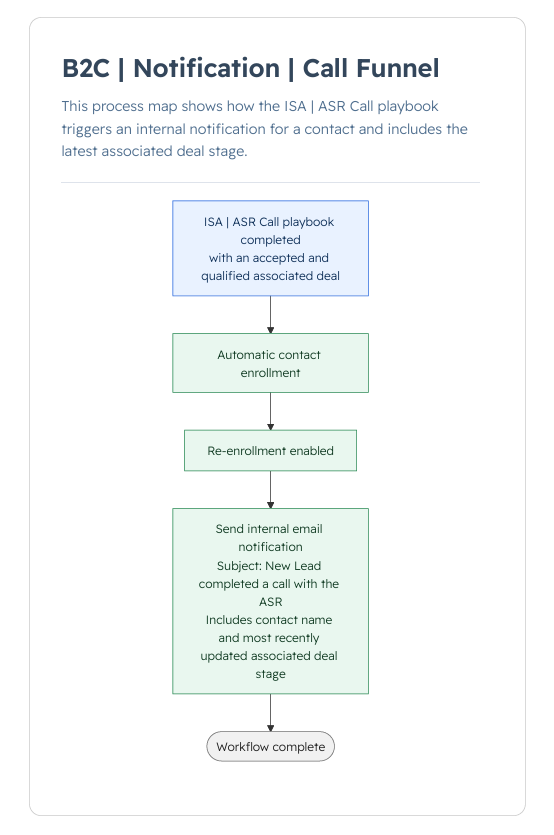
Workflow: B2C | Notification | Call Funnel
-
Contact-based
-
Manual and automatic enrollment
- ISA | ASR Call Playbook is logged on a Contact and Deal stage is Accepted (checked and qualified)
- Logging the playbook again will trigger another enrollment and notification if the Deal stage is Accepted (checked and qualified)
-
Notification:
-
Subject: New Lead completed a call with an ASR
-
Recipient: ISA Agent
-
Body: Enrolled Contact’s name and Deal stage
-
Dashboard: ISA Lead Intake